- Published on
- |- 次浏览
简单的自定义视图和节点
- Authors

- Name
- 东哥
本文描述了如何简单的创建自定义的视图和节点
后续补充具体功能开发
插件模块
创建插件TestGraph
- 包含如下模块
"Projects",
"InputCore",
"UnrealEd",
"LevelEditor",
"CoreUObject",
"Engine",
"Slate",
"SlateCore",
"ToolMenus",
"GraphEditor",
"EditorStyle"
在模块类里声明2个变量
class UEdGraph* GraphObj;//图表实例的类型,定义了该图表的行为(例如保存图表
`TSharedPtr<class SGraphEditor>` GraphEdSlate;//图表编辑器的Slate类型
构造GraphObj,指定GraphObj内的Schema
创建GraphEdSlate,同时把GraphObj指定给GraphEdSlate
GraphObj=`NewObject<UEdGraph>`();
GraphObj->AddToRoot();
GraphObj->Schema=UTestGraphSchema::StaticClass();//自定义的schema类,刚开始可以先使用默认的UGraphSchema即可显示基础图表
GraphEdSlate=SNew(SGraphEditor)
    .GraphToEdit(GraphObj);
在返回中添加次Slate类
return SNew(SDockTab)
		.TabRole(ETabRole::NomadTab)
		[
			// Put your tab content here!
			SNew(SBox)
			.HAlign(HAlign_Fill)
			.VAlign(VAlign_Fill)
			[
				GraphEdSlate.ToSharedRef()//需要转成ref
			]
		];
Schema
EdGraphSchema里定义了图表操作的大部分全局行为- 在
FBlueprintEditorUtils::CreateNewGraph中将UEdGraph和EdGraphSchema建立映射 FEdGraphSchemaAction类主要执行了一个PerformAction,用于生成UEdGraphNode
FEdGraphSchemaAction
- PerformAction
生成节点
UEdGraphNode* FTestGraphSchemaAction::PerformAction(class UEdGraph* ParentGraph, UEdGraphPin* FromPin, const FVector2D Location, bool bSelectNewNode /* = true */)
{
	UEdGraphNode* resNode=nullptr;
	if (NodeHello)
	{
		const FScopedTransaction Trans(LOCTEXT("FF","Hello:NewNode"));
		ParentGraph->Modify();
		if (FromPin!=nullptr)
		{
			FromPin->Modify();
		}
		NodeHello->Rename(TEXT("TEST"),ParentGraph);
		ParentGraph->AddNode(NodeHello,true,bSelectNewNode);

		NodeHello->CreateNewGuid();//唯一标识
		NodeHello->PostPlacedNewNode();//初始化
		NodeHello->AllocateDefaultPins();//针脚
		NodeHello->AutowireNewNode(FromPin);//自动创建节点

		NodeHello->NodePosX=Location.X;
		NodeHello->NodePosY = Location.Y;

		NodeHello->SetFlags(RF_Transactional);

		resNode=NodeHello;
	}

	return resNode;

}
UEdGraphSchema
- GetGraphContextActions
右键点击空白页面,用于创建选择节点
void UTestGraphSchema::GetGraphContextActions(FGraphContextMenuBuilder& ContextMenuBuilder) const
{
	`TSharedPtr<FTestGraphSchemaAction>` NewNodeAction(new
	FTestGraphSchemaAction(LOCTEXT("11","GraphNode"),
	LOCTEXT("Desc","TestNodeDesc"), //desc
	LOCTEXT("NewGraphText","Add Hello Node"),//hover
	0));

	NewNodeAction->NodeHello=`NewObject<UTestNode_Hello>`(ContextMenuBuilder.OwnerOfTemporaries/*存储节点*/);
	ContextMenuBuilder.AddAction(NewNodeAction);

}
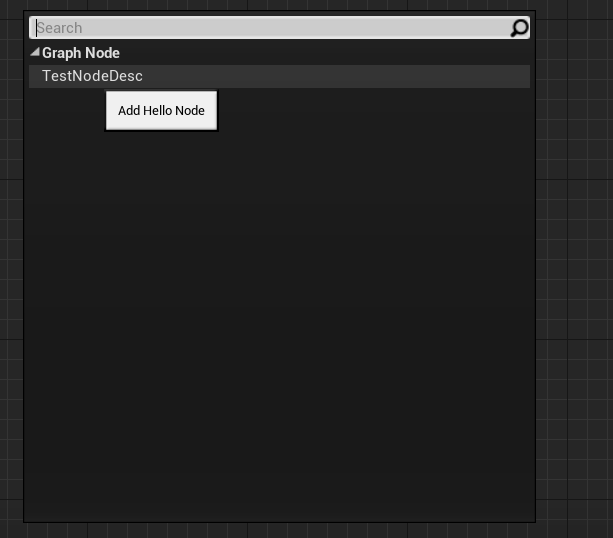
如上图,显示3个对应的名称
- GetContextMenuActions
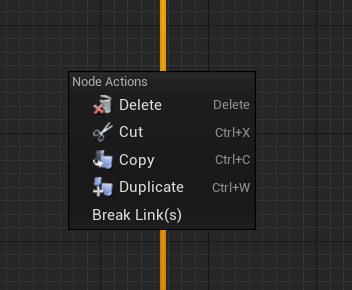
右键点击节点后的效果,产生例如BreakLink之类的效果
此方法在4.24版本(不确定之前哪个版本开始)有更改如下
virtual void GetContextMenuActions(class UToolMenu* Menu, class UGraphNodeContextMenuContext* Context)const//新版本
void GetContextMenuActions(const UEdGraph* CurrentGraph, const UEdGraphNode* InGraphNode, const UEdGraphPin* InGraphPin, class FMenuBuilder* MenuBuilder, bool bIsDebugging) const; //旧版本
void UTestGraphSchema::GetContextMenuActions(class UToolMenu* Menu, class UGraphNodeContextMenuContext* Context) const
{
	if (Context->Pin)
	{
		{
			FToolMenuSection& Section = Menu->AddSection("TestGraphSchemaNodeActions", LOCTEXT("PinActionsMenuHeader", "Pin Actions ___"));
			// Only display the 'Break Links' option if there is a link to break!
			if (Context->Pin->LinkedTo.Num() > 0)
			{
				Section.AddMenuEntry(FGraphEditorCommands::Get().BreakPinLinks);

				// add sub menu for break link to
				if (Context->Pin->LinkedTo.Num() > 1)
				{
					Section.AddSubMenu(
						"BreakLinkTo",
						LOCTEXT("BreakLinkTo", "Break Link To..."),
						LOCTEXT("BreakSpecificLinks", "Break a specific link..."),
						{}
						);
				}
			}
		}
	}
	else
	if (Context->Node)
	{
		{
			FToolMenuSection& Section = Menu->AddSection("TestGraphSchemaNodeActions", LOCTEXT("ClassActionsMenuHeader", "Node Actions"));
			Section.AddMenuEntry(FGenericCommands::Get().Delete);
			Section.AddMenuEntry(FGenericCommands::Get().Cut);
			Section.AddMenuEntry(FGenericCommands::Get().Copy);
			Section.AddMenuEntry(FGenericCommands::Get().Duplicate);

			Section.AddMenuEntry(FGraphEditorCommands::Get().BreakNodeLinks);
		}
	}
	Super::GetContextMenuActions(Menu, Context);
}
连接方式
UENUM()
enum ECanCreateConnectionResponse
{
	/** 多对多 */
	CONNECT_RESPONSE_MAKE,

	/*不能连接,默认 */
	CONNECT_RESPONSE_DISALLOW,

	/** 多对一 */
	CONNECT_RESPONSE_BREAK_OTHERS_A,

	/** 一对多 */
	CONNECT_RESPONSE_BREAK_OTHERS_B,

	/** 一对一 */
	CONNECT_RESPONSE_BREAK_OTHERS_AB,

	/** Make the connection via an intermediate cast node, or some other conversion node. */
	CONNECT_RESPONSE_MAKE_WITH_CONVERSION_NODE,

	CONNECT_RESPONSE_MAX,
};
重写CanCreateConnection设置节点的连接方式
virtual const FPinConnectionResponse CanCreateConnection(const UEdGraphPin* A, const UEdGraphPin* B) const
	{
		return FPinConnectionResponse(CONNECT_RESPONSE_BREAK_OTHERS_A, TEXT("Not 2 by this schema"));
	}
- 创建连接方式
使用自定义的类FTestConnectionDrawingPolicy来定义连接方式
class FConnectionDrawingPolicy* UTestGraphSchema::CreateConnectionDrawingPolicy(int32 InBackLayerID, int32 InFrontLayerID, float InZoomFactor, const FSlateRect& InClippingRect, class FSlateWindowElementList& InDrawElements, class UEdGraph* InGraphObj) const
{
	return new FTestConnectionDrawingPolicy(InBackLayerID,InFrontLayerID,InZoomFactor,InClippingRect,InDrawElements, InGraphObj);
}
自定义节点
UEdGraphNode
EdGraphNode是图表节点实例的类型,定义了节点的行为AutowireNewNode定义了节点的自动连接行为( 参考上述在schema创建的时候调用)
class UTestNode_Hello :public UEdGraphNode
重写2个方法
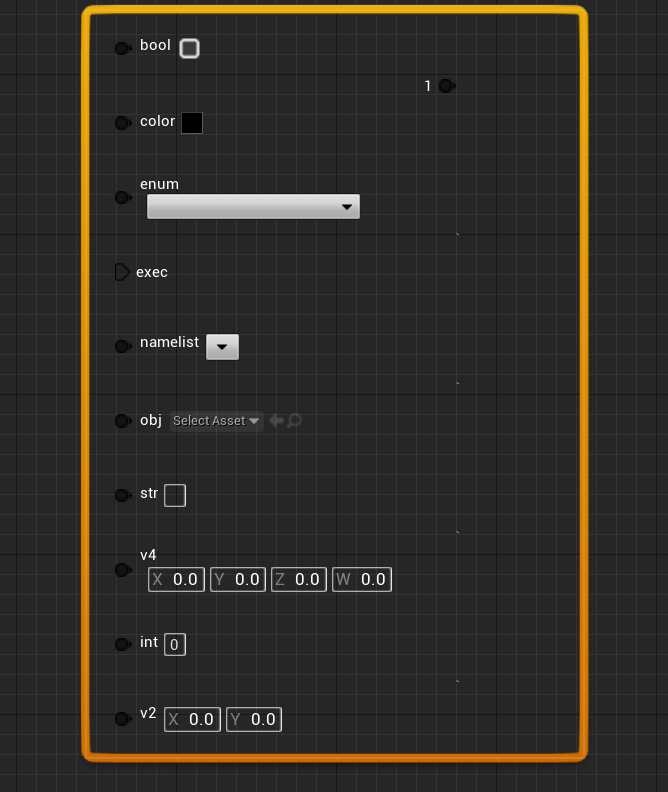
AllocateDefaultPins:用于创建节点
GetNodeTitle:标题
可以参考系统的节点
目录大多在
\Engine\Source\Editor\GraphEditor\Public\KismetPins\
void UTestNode_Hello::AllocateDefaultPins()
{
	CreatePin(EGPD_Input,"HelloNodeInput_Bool",FName(),TEXT("bool"));
	CreatePin(EGPD_Input, "HelloNodeInput_Color", FName(), TEXT("color"));
	CreatePin(EGPD_Input, "HelloNodeInput_Enum", FName(), TEXT("enum"));
	CreatePin(EGPD_Input, "HelloNodeInput_Exec", FName(), TEXT("exec"));
	CreatePin(EGPD_Input, "HelloNodeInput_NameList", FName(), TEXT("namelist"));
	CreatePin(EGPD_Input, "HelloNodeInput_Object", FName(), TEXT("obj"));
	CreatePin(EGPD_Input, "HelloNodeInput_String", FName(), TEXT("str"));
	CreatePin(EGPD_Input, "HelloNodeInput_Vector4", FName(), TEXT("v4"));
	CreatePin(EGPD_Input, "HelloNodeInput_Integer", FName(), TEXT("int"));
	CreatePin(EGPD_Input, "HelloNodeInput_Vector2", FName(), TEXT("v2"));

	CreatePin(EGPD_Output, "HelloNodeInput_1", FName(), TEXT("1"));
	CreatePin(EGPD_Output, "HelloNodeInput_2", FName(), TEXT("2"));
	CreatePin(EGPD_Output, "HelloNodeInput_3", FName(), TEXT("3"));
	CreatePin(EGPD_Output, "HelloNodeInput_4", FName(), TEXT("4"));
	CreatePin(EGPD_Output, "HelloNodeInput_5", FName(), TEXT("5"));
}

FText UTestNode_Hello::GetNodeTitle(ENodeTitleType::Type TitleType) const
{
	return FText::FromString("Hello !");
}
SGraphNode
此类是用于显示具体效果的
void Construct(const FArguments& InArgs, UEdGraphNode* InNode);//构造跟默认slate不一样
virtual void UpdateGraphNode()override;//刷新节点
virtual void CreatePinWidgets()override;//创建pin的ui显示
virtual void AddPin( const `TSharedRef<SGraphPin>`& PinToAdd )override;//添加pin,不重写就使用默认的(一个圆点)
protected:
	`TSharedPtr<class SBox>` PinBox;
- 构造
GraphNode= InNode;//自带的变量,存储对应的UEdGraphNode
this->SetCursor(EMouseCursor::GrabHand);//鼠标样式
this->UpdateGraphNode();
- 刷新节点
void STestNode::UpdateGraphNode()
{
    //清空所有的Pin和box
	InputPins.Empty();
	OutputPins.Empty();
	RightNodeBox.Reset();
	LeftNodeBox.Reset();
	//从style得到icon
	const FSlateBrush* nodeIcon=FEditorStyle::GetBrush(TEXT("Graph.StateNode.Icon"));

//用此方法创建一个视图
	this->GetOrAddSlot(ENodeZone::Center)
		.HAlign(HAlign_Center)
		.VAlign(VAlign_Center)
		[
			SAssignNew(PinBox,SBox)
			.VAlign(VAlign_Fill)
			.HAlign(HAlign_Fill)
			[
				SNew(SBorder)
				.BorderBackgroundColor_Lambda([&]()
			{
				FSlateColor color(FLinearColor(1,1,1));
				return color;
			})
        //注释代码可以手动设置图片
		//.BorderImage_Lambda([&]()
		//	{
		//	const FVector2D iconSize(64.0,64.0);
		//	return FTestGraphStyle::GetImageBrush(TEXT("ButtonIcon_40x"),iconSize);
		//	})
			[
                //添加2个自带的NodeBox,注意顺序需要先左后右
				SNew(SHorizontalBox)
				+SHorizontalBox::Slot()
				.HAlign(HAlign_Fill)
				.VAlign(VAlign_Fill)
				.AutoWidth()
				[
					SAssignNew(LeftNodeBox,SVerticalBox)
				]
			+ SHorizontalBox::Slot()
				.HAlign(HAlign_Fill)
				.VAlign(VAlign_Fill)
				.AutoWidth()
				[
					SAssignNew(RightNodeBox,SVerticalBox)
				]

			]

			]


		];

//设置顶层box尺寸
		PinBox->SetWidthOverride(400);
		PinBox->SetHeightOverride(600);
//创建PinWidget
		CreatePinWidgets();
}
- 创建Pin的图形
2种方式,可以手动指定Pin,也可以使用系统的Pin
//手动指定所有Pin
void STestNode::CreatePinWidgets()
{
    UTestNode_Hello* helloNode=`CastChecked<UTestNode_Hello>`(GraphNode);
	if (helloNode)
    {
        //全部的Pin都指定为STestPin
        for (auto p : helloNode->Pins)
		{
			`TSharedPtr<SGraphPin>` pin = SNew(STestPin, p);
			pin->SetIsEditable(IsEditable);//把Node的可编辑性赋予Pin
			this->AddPin(pin.ToSharedRef());//添加pin
		}
    }
}
//使用系统的Pin
//用一个宏快速定义
//注意宏里的newPin对应的是第15行创建的指针变量
//顺序对应的是UEdGraphNode中创建的Pin
#define RESET_PIN(STestPin,GraphPinObj,...)\
		newPin = SNew(STestPin,GraphPinObj,__VA_ARGS__);\
		newPin->SetIsEditable(IsEditable);\
		this->AddPin(newPin.ToSharedRef());
void STestNode::CreatePinWidgets()
{
    static TArray<`TSharedPtr<FName>`> nameList;
	nameList.Add(MakeShareable(new FName("player")));
	nameList.Add(MakeShareable(new FName("monster")));
	nameList.Add(MakeShareable(new FName("ai")));

	`TSharedPtr<SGraphPin>` newPin=nullptr;
	RESET_PIN(SGraphPinBool,helloNode->Pins[0]);
	RESET_PIN(SGraphPinColor, helloNode->Pins[1]);
	RESET_PIN(SGraphPinEnum, helloNode->Pins[2]);
	RESET_PIN(SGraphPinExec, helloNode->Pins[3]);
	RESET_PIN(SGraphPinNameList, helloNode->Pins[4],nameList);
	RESET_PIN(SGraphPinObject, helloNode->Pins[5]);
	RESET_PIN(SGraphPinString, helloNode->Pins[6]);
	RESET_PIN(SGraphPinVector4, helloNode->Pins[7]);
	RESET_PIN(SGraphPinInteger, helloNode->Pins[8]);
	RESET_PIN(SGraphPinVector2D, helloNode->Pins[9]);
	RESET_PIN(SGraphPinClass, helloNode->Pins[10]);
	RESET_PIN(STestPin, helloNode->Pins[11]);
	RESET_PIN(STestPin, helloNode->Pins[12]);
	RESET_PIN(STestPin, helloNode->Pins[13]);
	RESET_PIN(STestPin, helloNode->Pins[14]);
}
- AddPin
用来设置Pin的显示和布局
如果不重写,就使用系统自带的Pin(非常的小)
void STestNode::AddPin(const `TSharedRef<SGraphPin>`& PinToAdd)
{
    //设置owner
	PinToAdd->SetOwner(SharedThis(this));
	//得到对应的Obj
	const UEdGraphPin* PinObj = PinToAdd->GetPinObj();
    //设置可见性
	if (PinObj&&PinObj->bAdvancedView)
	{
		PinToAdd->SetVisibility(`TAttribute<EVisibility>`(PinToAdd, &SGraphPin::IsPinVisibleAsAdvanced));
	}
#if CUSTOM_PIN
    //如果是自定义的Pin就设置缩放,用系统自带的就不需要了
	PinToAdd->SetDesiredSizeScale(FVector2D(16, 16));
#endif

//判断是输入和是输出节点
	if (PinToAdd->GetDirection() == EEdGraphPinDirection::EGPD_Input)
	{
        //添加到左边盒子里
		LeftNodeBox->AddSlot()
			.HAlign(HAlign_Fill)
			.VAlign(VAlign_Fill)
			.FillHeight(1.0f)
			.Padding(20.0f, 0)
			[
				PinToAdd
			];
        //添加到InputPins数组里
		InputPins.Add(PinToAdd);
	}
	else if (PinToAdd->GetDirection() == EEdGraphPinDirection::EGPD_Output)
	{
		RightNodeBox->AddSlot()
			.HAlign(HAlign_Right)
			.VAlign(VAlign_Center)
			.FillHeight(1.0f)
			.Padding(-30.0f, 0.f)
			[
				PinToAdd
			];
		OutputPins.Add(PinToAdd);
	}
}
自定义连线
继承自FConnectionDrawingPolicy
- 构造函数
//.h
FTestConnectionDrawingPolicy(int32 InBackLayerID, //线ID
	int32 InFrontLayerID, //箭头ID
	float InZoomFactor, //缩放
	const FSlateRect& InClippingRect,//视口裁剪
	FSlateWindowElementList& InDrawElements,//绘制元素
	UEdGraph* InGraphObj);
/*
protected:
	UEdGraph* EdGraphObj;
	TMap<UEdGraph*, int32>EdNodeWidgetMap;*/

//cpp
FTestConnectionDrawingPolicy::FTestConnectionDrawingPolicy(int32 InBackLayerID, int32 InFrontLayerID, float InZoomFactor, const FSlateRect& InClippingRect, FSlateWindowElementList& InDrawElements , UEdGraph* InGraphObj)
:FConnectionDrawingPolicy(InBackLayerID,InFrontLayerID,InZoomFactor,InClippingRect,InDrawElements),EdGraphObj(InGraphObj)
{

}
- 设置样式
void FTestConnectionDrawingPolicy::DetermineWiringStyle(UEdGraphPin* OutputPin, UEdGraphPin* InputPin, /*inout*/ FConnectionParams& Params)
{
	Params.WireThickness=3;//宽度
	Params.WireColor=FLinearColor::Green;//颜色
	if (HoveredPins.Num()>0)
	{
		ApplyHoverDeemphasis(OutputPin,InputPin, Params.WireThickness = 3, Params.WireColor);//此方法显示拖动效果
	}
}
- 绘制连接
如果不重写就使用默认的贝塞尔曲线
//绘制直线+流动的泡泡
void FTestConnectionDrawingPolicy::DrawConnection(int32 LayerId, const FVector2D& Start, const FVector2D& End, const FConnectionParams& Params)
{
	const FVector2D delta=End-Start;
	const FVector2D DirDelta=delta.GetSafeNormal();
	//变成直线
	FSlateDrawElement::MakeDrawSpaceSpline(
	DrawElementsList,
	LayerId,
	Start,DirDelta,
	End,DirDelta,
	Params.WireThickness,
	ESlateDrawEffect::None,
	Params.WireColor
	);
	//使用气泡
    //底线一堆算法就是为了MakeBox
	if (bUseBubble)
	{
		`FInterpCurve<float>` SplineCurve;
		float splineLength=MakeSplineReparamTable(Start,DirDelta,End,DirDelta,SplineCurve);

		const float BubbleSpacing=32*ZoomFactor;
		const float BubbleSpeed=64*ZoomFactor;
		const FVector2D BubbleSize=BubbleImage->ImageSize*ZoomFactor*0.1*Params.WireThickness;

		float deltaTime=FPlatformTime::Seconds()-GStartTime;
		const float BubbleOffset=FMath::Fmod(deltaTime*BubbleSpeed,BubbleSpacing);
		const int32 num=FMath::CeilToInt(splineLength-BubbleSpacing);

		for (int32 i=0;i<num;i++)
		{
			const float dis = float(i)*BubbleSpacing+BubbleOffset;
			if (dis<splineLength)
			{
				const float alpha=SplineCurve.Eval(dis,0);
				FVector2D bubblePos=FMath::CubicInterp(Start,DirDelta,End,DirDelta,alpha);
				bubblePos-= BubbleSize*0.5;

				FSlateDrawElement::MakeBox(DrawElementsList,LayerId,
				FPaintGeometry(bubblePos,BubbleSize,ZoomFactor),
				BubbleImage,
				ESlateDrawEffect::None,
				Params.WireColor
				);
			}
		}
	}
}
工厂类
可以用工厂类来注册Node,Pin,ConnectionPolicy
重写如下方法
virtual `TSharedPtr<class SGraphNode>` CreateNode(class UEdGraphNode* Node) const { return NULL; }
virtual `TSharedPtr<class SGraphPin>` CreatePin(class UEdGraphPin* Pin) const { return NULL; }
    virtual class FConnectionDrawingPolicy* CreateConnectionPolicy(const class UEdGraphSchema* Schema, int32 InBackLayerID, int32 InFrontLayerID, float ZoomFactor, const class FSlateRect& InClippingRect, class FSlateWindowElementList& InDrawElements, class UEdGraph* InGraphObj) const { return nullptr; }
`TSharedPtr<class SGraphNode>` FTestNodeFactory::CreateNode(class UEdGraphNode* Node) const
{
	if (UTestNode_Hello* nd=`Cast<UTestNode_Hello>`(Node))
	{
		return SNew(STestNode,nd);
	}
	return nullptr;
}
`TSharedPtr<class SGraphPin>` FTestNodePinFactory::CreatePin(class UEdGraphPin* Pin) const
{
	if (UTestNode_Hello* nd=`Cast<UTestNode_Hello>`(Pin->GetOuter()))
	{
		return SNew(STestPin,Pin);
	}
	return nullptr;
}
class FConnectionDrawingPolicy* FTestConnectionFactory::CreateConnectionPolicy(const class UEdGraphSchema* Schema, int32 InBackLayerID, int32 InFrontLayerID, float ZoomFactor, const class FSlateRect& InClippingRect, class FSlateWindowElementList& InDrawElements, class UEdGraph* InGraphObj) const
{
	if (Schema->IsA(UTestGraphSchema::StaticClass()))
	{
		return new FTestConnectionDrawingPolicy(InBackLayerID,InFrontLayerID,ZoomFactor,InClippingRect,InDrawElements, InGraphObj);
	}
	return nullptr;
}
然后在模块加载的时候注册,这样就可以去掉在schema内的内容
FEdGraphUtilities::RegisterVisualNodeFactory(MakeShareable(new FTestNodeFactory));
FEdGraphUtilities::RegisterVisualPinConnectionFactory(MakeShareable(new FTestConnectionFactory));
FEdGraphUtilities::RegisterVisualPinFactory(MakeShareable(new FTestNodePinFactory));
//virtual class FConnectionDrawingPolicy* CreateConnectionDrawingPolicy(int32 InBackLayerID, int32 InFrontLayerID, float InZoomFactor, const FSlateRect& InClippingRect, class FSlateWindowElementList& InDrawElements, class UEdGraph* InGraphObj)const override;