- Published on
- |- 次浏览
由SetActorLocation分析渲染流程
- Authors

- Name
- 东哥
角色位移本质上就是渲染问题,从这条思路我们去看看角色怎么实现这一部分渲染的
起点:SetActorLocation
蓝图调用的API实际调用的是K2_SetActorLocation,然后调用到此函数
return RootComponent->MoveComponent(Delta, GetActorQuat(), bSweep, OutSweepHitResult, MOVECOMP_NoFlags, Teleport);
只看这个关键代码,调用RootComponent的MoveComponent
USceneComponent
MoveComponent
外部调用此函数后里面直接调用到带
Impl后缀的虚函数这个函数在UPrimitiveComponent内有重写
USceneComponent内主要调用了函数ConditionalUpdateComponentToWorld,而UPrimitiveComponent因为有碰撞等属性所以又多了很多逻辑,这里不多描述
UpdateComponentToWorldWithParent
此函数通过
ConditionalUpdateComponentToWorld调用,后又调用到虚函数UpdateComponentToWorld,此虚函数在UActorComponent声明,在USceneComponent重写然后再直接调用到此函数
	if (Parent && !Parent->bComponentToWorldUpdated)
	{
		Parent->UpdateComponentToWorld();

		if (bComponentToWorldUpdated)
		{
			return;
		}
	}
如果有父级组件,先去处理他
然后调用到函数PropagateTransformUpdate
PropagateTransformUpdate
该函数执行了
- 更新体积(Bounds)
- 更新变换(Transform)
- 更新Attach的子组件的变换信息
- 更新寻路信息
其中有个关键的函数UActorComponent::MarkRenderTransformDirty
然后经过简单判断以后调用UActorComponent::MarkForNeededEndOfFrameUpdate
然后调用了UWorld 的MarkActorComponentForNeededEndOfFrameUpdate
看主要代码
void UActorComponent::MarkRenderTransformDirty()
{
	if (IsRegistered() && bRenderStateCreated)
	{
		bRenderTransformDirty = true;
		MarkForNeededEndOfFrameUpdate();
	}
}
void UActorComponent::MarkForNeededEndOfFrameUpdate()
{
	if (bNeverNeedsRenderUpdate)
	{
		return;
	}

	UWorld* ComponentWorld = GetWorld();
	if (ComponentWorld)
	{
		ComponentWorld->MarkActorComponentForNeededEndOfFrameUpdate(this, RequiresGameThreadEndOfFrameUpdates());
	}
	else if (!IsUnreachable())
	{
		// 如果没有世界,执行如下代码
		DoDeferredRenderUpdates_Concurrent();
	}
}
UWorld
MarkActorComponentForNeededEndOfFrameUpdate
代码在LevelTick.cpp L883
主要执行了把组件添加到了等待渲染的列表ComponentsThatNeedEndOfFrameUpdate_OnGameThread里,当然还有一个非游戏线程的ComponentsThatNeedEndOfFrameUpdate
if (bForceGameThread)
		{
			FMarkComponentEndOfFrameUpdateState::Set(Component, ComponentsThatNeedEndOfFrameUpdate_OnGameThread.Num(), EComponentMarkedForEndOfFrameUpdateState::MarkedForGameThread);
			ComponentsThatNeedEndOfFrameUpdate_OnGameThread.Add(Component);
		}
		else
		{
			FMarkComponentEndOfFrameUpdateState::Set(Component, ComponentsThatNeedEndOfFrameUpdate.Num(), EComponentMarkedForEndOfFrameUpdateState::Marked);
			ComponentsThatNeedEndOfFrameUpdate.Add(Component);
		}
到此我们大概知道了这一条线的终点了,然后去看看哪里使用到了这个数组
SendAllEndOfFrameUpdates
确认使用上面数组是在此函数内,查找引用发现此函数在很多地方被调用,如SceneRendering.cpp,UnrealEngine.cpp大概就是要更新场景最新的渲染的时候就会调用,先不理会,看这个函数内实现
	for (UActorComponent* Component : ComponentsThatNeedEndOfFrameUpdate_OnGameThread)
			{
				if (Component)
				{
					if (Component->IsRegistered() && !Component->IsTemplate() && !Component->IsPendingKill())
					{
						FScopeCycleCounterUObject ComponentScope(Component);
						FScopeCycleCounterUObject AdditionalScope(STATS ? Component->AdditionalStatObject() : nullptr);
						Component->DoDeferredRenderUpdates_Concurrent();
					}

					check(Component->IsPendingKill() || Component->GetMarkedForEndOfFrameUpdateState() == EComponentMarkedForEndOfFrameUpdateState::MarkedForGameThread);
					FMarkComponentEndOfFrameUpdateState::Set(Component, INDEX_NONE, EComponentMarkedForEndOfFrameUpdateState::Unmarked);
				}
			}
			ComponentsThatNeedEndOfFrameUpdate_OnGameThread.Reset();
			ComponentsThatNeedEndOfFrameUpdate.Reset();
遍历了所有数组成员,主要执行了DoDeferredRenderUpdates_Concurrent,回头看USceneComponent内的如果没有UWorld就直接调用了这个函数
UActorComponent
DoDeferredRenderUpdates_Concurrent
RecreateRenderState_Concurrent,SendRenderTransform_Concurrent,SendRenderDynamicData_Concurrent告诉引擎需要处理相应的渲染任务
void UActorComponent::DoDeferredRenderUpdates_Concurrent()
{
	checkf(!IsUnreachable(), TEXT("%s"), *GetFullName());
	checkf(!IsTemplate(), TEXT("%s"), *GetFullName());
	checkf(!IsPendingKill(), TEXT("%s"), *GetFullName());

	FScopeCycleCounterUObject ContextScope(this);

	if(!IsRegistered())
	{
		UE_LOG(LogActorComponent, Log, TEXT("UpdateComponent: (%s) Not registered, Aborting."), *GetPathName());
		return;
	}

	if(bRenderStateDirty)
	{
		SCOPE_CYCLE_COUNTER(STAT_PostTickComponentRecreate);
		RecreateRenderState_Concurrent();
		checkf(!bRenderStateDirty, TEXT("Failed to route CreateRenderState_Concurrent (%s)"), *GetFullName());
	}
	else
	{
		SCOPE_CYCLE_COUNTER(STAT_PostTickComponentLW);
		if(bRenderTransformDirty)
		{
			// Update the component's transform if the actor has been moved since it was last updated.
			SendRenderTransform_Concurrent();
		}

		if(bRenderDynamicDataDirty)
		{
			SendRenderDynamicData_Concurrent();
		}
	}
}
SendRenderTransform_Concurrent
这个函数在基类只做了基础实现,主要是派生类重写实现主要逻辑,类似的也包括SendRenderDynamicData_Concurrent,CreateRenderState_Concurrent
{
	check(bRenderStateCreated);
	bRenderTransformDirty = false;

#if LOG_RENDER_STATE
	UE_LOG(LogActorComponent, Log, TEXT("SendRenderTransform_Concurrent: %s"), *GetPathName());
#endif
}
UPrimitiveComponent
紧接上面,我们看看有形状体积等信息的UPrimitiveComponent
SendRenderTransform_Concurrent
void UPrimitiveComponent::SendRenderTransform_Concurrent()
{
	UpdateBounds();
	const bool bDetailModeAllowsRendering	= DetailMode <= GetCachedScalabilityCVars().DetailMode;
	if( bDetailModeAllowsRendering && (ShouldRender() || bCastHiddenShadow))
	{
		GetWorld()->Scene->UpdatePrimitiveTransform(this);
	}

	Super::SendRenderTransform_Concurrent();
}
看到在实现基类逻辑之前执行了FScene内的函数UpdatePrimitiveTransform
FScene
代码在 RendererScene.cpp中
UpdatePrimitiveTransform
在UpdatePrimitiveTransform函数中会判断该Primitive有没有SceneProxy,如果有SceneProxy则判断该Primitive是否需要重新创建,如果需要重新创建则需要先删除,然后再添加该Primitive;如果没有SceneProxy则直接加入到场景中。接着我们具体看一下AddPrimitive函数的具体实现:
AddPrimitive
此函数主要做了如下几件事情
- 创建
SceneProxy和PrimitiveSceneInfo - 利用
FPrimitiveSceneInfo封装UPrimitiveComponent的信息,继续在render线程中进行操作 - 给渲染线程发送2个命令,分别是设置
Primitive的Transform信息和将PrimitiveSceneInfo加入到渲染线程的数据集合中
代码如下
FPrimitiveSceneProxy* PrimitiveSceneProxy = Primitive->CreateSceneProxy();
	Primitive->SceneProxy = PrimitiveSceneProxy;
// Create the primitive scene info.
	FPrimitiveSceneInfo* PrimitiveSceneInfo = new FPrimitiveSceneInfo(Primitive, this);
	PrimitiveSceneProxy->PrimitiveSceneInfo = PrimitiveSceneInfo;
// Create any RenderThreadResources required.
	ENQUEUE_RENDER_COMMAND(CreateRenderThreadResourcesCommand)(
		[Params](FRHICommandListImmediate& RHICmdList)
	{
		FPrimitiveSceneProxy* SceneProxy = Params.PrimitiveSceneProxy;
		FScopeCycleCounter Context(SceneProxy->GetStatId());
		SceneProxy->SetTransform(Params.RenderMatrix, Params.WorldBounds, Params.LocalBounds, Params.AttachmentRootPosition);

		// Create any RenderThreadResources required.
		SceneProxy->CreateRenderThreadResources();
	});
	ENQUEUE_RENDER_COMMAND(AddPrimitiveCommand)(
		[Scene, PrimitiveSceneInfo](FRHICommandListImmediate& RHICmdList)
		{
			FScopeCycleCounter Context(PrimitiveSceneInfo->Proxy->GetStatId());
			Scene->AddPrimitiveSceneInfo_RenderThread(RHICmdList, PrimitiveSceneInfo);
		});
AddPrimitiveSceneInfo_RenderThread
AddPrimitiveSceneInfo_RenderThread函数是在渲染线程执行的,完成PrimitiveBounds、PrimitiveFlagsCompact等数据的初始化后,并调用LinkAttachmentGroup处理primitive的父子关系,调用LinkLODParentComponent处理LOD父子关系,然后调用FPrimitiveSceneInfo::AddToScene
AddToScene最终会把物体添加到列表DrawList 中去完成绘制,这里不继续深挖了,埋个扣子,以后来解开
// Add the primitive to its shadow parent's linked list of children.
	// Note: must happen before AddToScene because AddToScene depends on LightingAttachmentRoot
PrimitiveSceneInfo->LinkAttachmentGroup();

// Set lod Parent information if valid
PrimitiveSceneInfo->LinkLODParentComponent();

// Add the primitive to the scene.
const bool bAddToDrawLists = !(CVarDoLazyStaticMeshUpdate.GetValueOnRenderThread() && !WITH_EDITOR);
if (bAddToDrawLists)
{
	PrimitiveSceneInfo->AddToScene(RHICmdList, true);
}
else
{
	PrimitiveSceneInfo->AddToScene(RHICmdList, true, false);
	PrimitiveSceneInfo->BeginDeferredUpdateStaticMeshes();
}
小结
由此我们就大致整理一下思路
设置Actor的位置,其实就是把新旧位置做一个插值,把这个插值传递给继承自USceneComponent的MoveComponent方法,然后在下一帧渲染出新的位置
这里也接上了并解释了之前AI_MoveTo的内容了
上一张流程简图
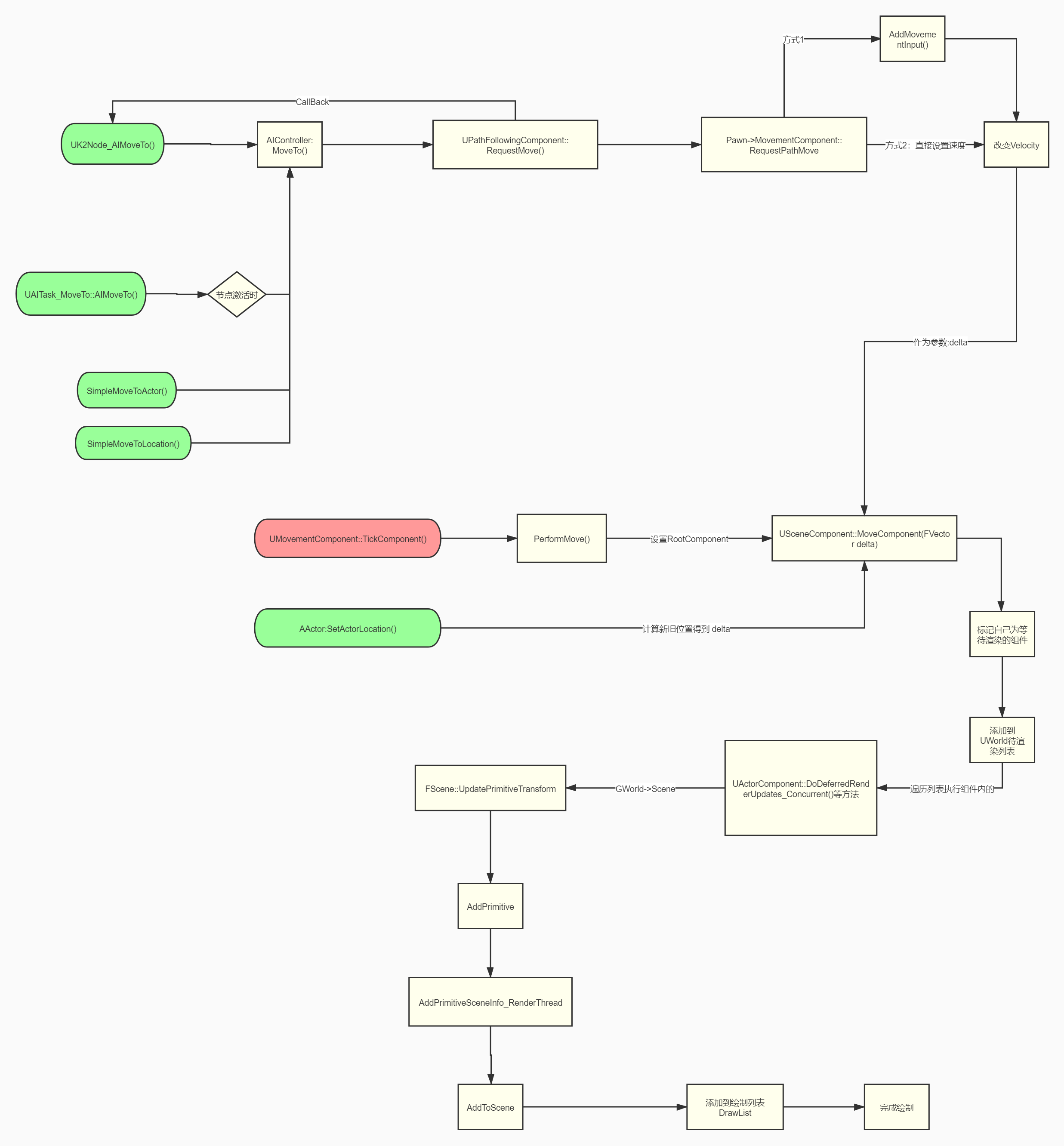
补充
场景中静态物体的渲染顺序堆栈表参考
ActorComponet::ExecuteRegisterEvents
UPrimitiveComponent::CreateRenderState_Concurrent
FScene:: AddPrimitive
FScene:: AddPrimitiveSceneInfo_RenderThread
FScene:: AddStaticMeshes
FStaticMesh::AddToDrawLists
FMobileBasePassOpaqueDrawingPolicyFactory::AddStaticMesh
ProcessMobileBasePassMesh
FDrawMobileBasePassStaticMeshAction:: Process
AddMeshToStaticDrawList
//加入到scene GetMobileBasePassDrawList中
最终加入队列 以DrawingPolicy 为key 的map队列
TStaticMeshDrawList<TMobileBasePassDrawingPolicy<FUniformLightMapPolicy, 0> > MobileBasePassUniformLightMapPolicyDrawList[EBasePass_MAX];